

Ever been pulled over by traffic police, fumbling through your wallet for your driving licence, only to realise it's expired or lost at home? What if you could show a valid digital copy from your phone in seconds—legally accepted across India? That's the power of DigiLocker, and this guide will walk you through every step to download your driving licence today.
What is DigiLocker and Why Use It for Your Driving Licence?
DigiLocker is a secure digital wallet launched by the Government of India under the Digital India initiative. It lets you store, access, and share official documents like Aadhaar, PAN, certificates, and yes—your driving licence—anytime, anywhere. No more worries about losing physical copies during travel or renewals.
Key Benefits for You:
- Legal Validity: A DigiLocker driving licence is as good as the original, recognised by traffic police, RTOs, courts, and even airports.
- Convenience: Access it offline once downloaded, share QR codes instantly, and get automatic updates from issuing authorities.
- Security: Government-backed encryption protects your data, with biometric login options.
Remember: Over 10 crore Indians have adopted DigiLocker, storing 12 billion+ documents digitally as of 2025, reducing paper use by millions of tonnes annually (Ministry of Electronics and IT). If you're a daily commuter, two-wheeler rider, or family driver, this saves you time and hassle.
Is Your Driving Licence Eligible for DigiLocker?
Not every licence qualifies automatically—it depends on your issuing RTO and when it was issued. Most licences from 2019 onwards (with Aadhaar or mobile linkage) fetch seamlessly. Older ones might need manual upload.
Tip: Check eligibility by entering your licence number on the DigiLocker site. If linked via Aadhaar or Parivahan, it pulls in seconds.
Note: Smartcard licences (post-2018) work best. If yours isn't digital-ready, visit your RTO for conversion—it's free and quick.
Statistic: 85% of new driving licences issued in India are now DigiLocker-compatible, per MoRTH data 2024.
Prerequisites: What You Need Before Starting
Before diving in, gather these:
- Mobile Number or Aadhaar: Linked to your DigiLocker account.
- Driving Licence Number: Found on your physical card (format: State Code + DL Number, e.g., GJ0123456789123).
- Internet Connection: For initial fetch; offline access later.
- App or Browser: Android/iOS app preferred for QR sharing.
Quote: "DigiLocker turns your smartphone into a lifelong document vault—paperless, portable, and foolproof." – Digital India Campaign.
Pro Tip: Download the official DigiLocker app from Google Play or App Store (over 50 million downloads). Avoid third-party links.
Step-by-Step Guide: How to Download Your Driving Licence
Let's break it down into simple, actionable steps. Follow along on your phone or computer—takes under 5 minutes.
Step 1: Create or Log In to Your DigiLocker Account
- Go to
- digilocker.gov.in
- or open the app.
- Click "Sign Up" if new: Enter your mobile number, receive OTP, set a password.
- Aadhaar Option: Faster—use Aadhaar for biometric login (face/fingerprint).
- Already have an account? Hit "Sign In" and verify with OTP.
Note: Use the same mobile/Aadhaar as on your licence for seamless linking.
Step 2: Navigate to Issued Documents
- Once logged in, tap the menu (three lines) or dashboard.
- Select "Issued Documents" (top option—blue folder icon in app).
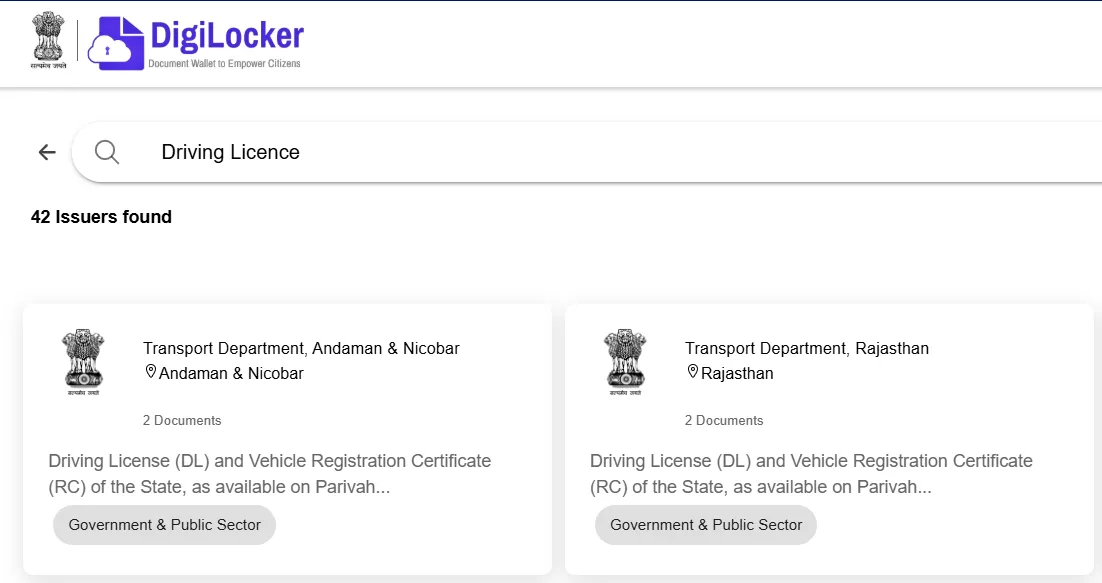
Tip: If you're on desktop, use the search bar: Type "Driving Licence."
Step 3: Search for Driving Licence
- Scroll to "Transport" or use search: "Driving Licence."
- Choose "Driving Licence - Ministry of Road Transport & Highways" (MoRTH).
- Select your issuing state (e.g., Gujarat, Maharashtra).
Statistic: MoRTH handles 90% of DL fetches via DigiLocker, processing 5 crore+ requests yearly.
Step 4: Enter Your Details and Fetch
- Input: Driving Licence Number, Date of Birth (DD/MM/YYYY), Captcha.
- Click "Get Document."
- Wait 10-30 seconds—system verifies with Parivahan database.
Remember: Double-check number (no spaces). Wrong entry? "Document not found" error—retry or contact RTO.
Step 5: Verify and Download
- Document appears in "Issued Documents."
- Tap "Download" (PDF icon)—saves to your device or DigiLocker storage.
- Share Option: Generate QR code for instant sharing with police/apps.
Pro Tip: Enable notifications for auto-updates on renewals/expiry.
Troubleshooting Common Errors:
|
Error |
Fix |
|
"Document Not Found" |
Verify DL number; link Aadhaar at RTO. |
|
OTP Issues |
Check signal; resend (3 tries). |
|
App Crashes |
Update app; clear cache. |
Statistic: 95% of fetches succeed on first try for linked accounts (DigiLocker Analytics 2025).
How to Use Your Downloaded Driving Licence
Your digital DL is ready! Here's how to make it work for you:
- Traffic Stops: Open app, show QR—police scans via Parivahan app.
- Sharing: Email PDF or WhatsApp QR to rentals/insurers.
- Offline Access: Download once, view without internet.
- Print Backup: PDF prints on A4—valid as soft copy proof.
Note: Always carry physical DL for international travel; digital accepted domestically.
"Gone are the days of bulky wallets—DigiLocker puts your licence in your pocket." – MoRTH Official.
You May Also Like to Read this Article - Renault Updates Triber With More Features on Lower Trims
Tips, Best Practices, and Common Mistakes to Avoid
Top 5 Tips for Smooth Experience:
- Link Everything Early: Connect Aadhaar, PAN, Voter ID—future-proofs your vault.
- Regular Checks: Set reminders to verify expiry (app notifies 30 days prior).
- Backup PDFs: Save to Google Drive/iCloud.
- Family Accounts: Create for spouse/kids—share access safely.
- Renewals: DL expiry? Renew via Parivahan, auto-syncs to DigiLocker.
Mistakes to Avoid:
- Using fake apps—stick to official.
- Forgetting OTP mobile—update if changed.
- Ignoring space in DL number.
Statistic: Users save 2-3 hours yearly on document hunts; 70% report fewer fines post-DigiLocker (User Survey 2024, MeitY).
Remember: DigiLocker documents have tamper-proof seals—authorities verify authenticity instantly.
Renewing Your Driving Licence via DigiLocker
Expiry nearing? Renew digitally:
- Visit sarathi.parivahan.gov.in
- New DL auto-pushes to DigiLocker.
- Apply for renewal, pay fee (₹200-500).
- New DL auto-pushes to DigiLocker.
Tip: Renew 60 days before expiry to avoid fines (₹500-1000).
FAQ’S
1. How do I download my driving licence from DigiLocker?
Open the official DigiLocker app or website, sign in with your mobile number or Aadhaar-linked account, then go to the Transport section and choose Driving Licence under the Ministry of Road Transport and Highways. Enter your driving licence number and date of birth, then tap Get Document. Once it appears in Issued Documents, you can view or download the PDF.
2. Is a DigiLocker driving licence valid as an original document?
Yes, a driving licence stored in DigiLocker is widely accepted as a valid digital document in India. DigiLocker is a government-backed platform for issuing and verifying documents in digital form, designed under the Digital India programme. In normal domestic use, you can show the digital copy when needed.
3. What details are needed to fetch my driving licence?
Usually, you need your driving licence number and date of birth. In some cases, DigiLocker may also ask you to verify your mobile number or Aadhaar-linked account for authentication. Make sure the licence number is entered exactly as it appears on your card, including state and RTO codes.
4. Why is my driving licence not showing in DigiLocker?
If your licence does not appear, the most common reasons are an incorrect licence number, a mismatch in date of birth, or an account that is not properly linked to your verified details. Try entering the information again carefully. If the document still does not appear, it may not yet be available in the issuing authority’s database.
5. Can I download my driving licence without Aadhaar?
In many cases, you can sign up with a mobile number, but Aadhaar-linked verification may be required for full document fetching and account security. DigiLocker’s official process supports identity verification through Aadhaar or registered mobile number, depending on the document and account setup.
Final Thoughts
Downloading your driving licence via DigiLocker isn't just convenient—it's a step towards a paperless life. With billions of documents secured and growing adoption, you're joining millions who drive worry-free. Head to DigiLocker now, fetch your DL in minutes, and breathe easy on the road.